
SKILL.md
/iblai-vibe-project
Add the ibl.ai project surface to your Next.js app: project files, project instructions, list of agents assigned to a project, and the project-scoped chat input. Reuses the SDK's Chat component — when you pass a projectId, the SDK automatically swaps its default welcome/explore surface for ProjectLandingPage. The same <Chat> you already mounted for /iblai-vibe-agent-chat does both modes; this skill just adds the routing + URL plumbing.
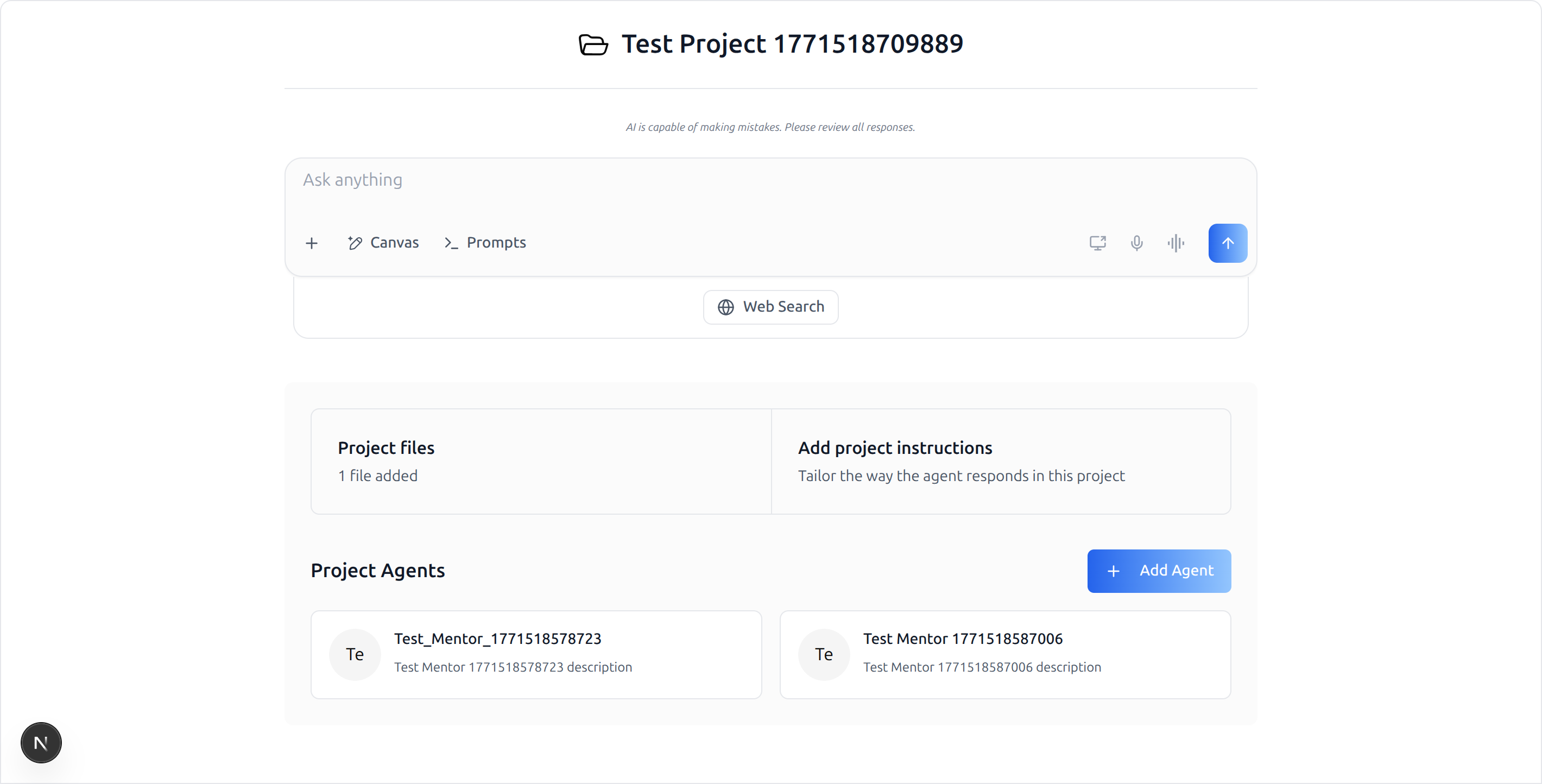
What you get: a route at
/agents/[mentorId]/projects/[projectId]
that reads both IDs from the URL, hands them to<Chat>, and the SDK
renders the project landing page (chat input + Project files / Add
project instructions cards + Project Agents grid). Clicking "Project
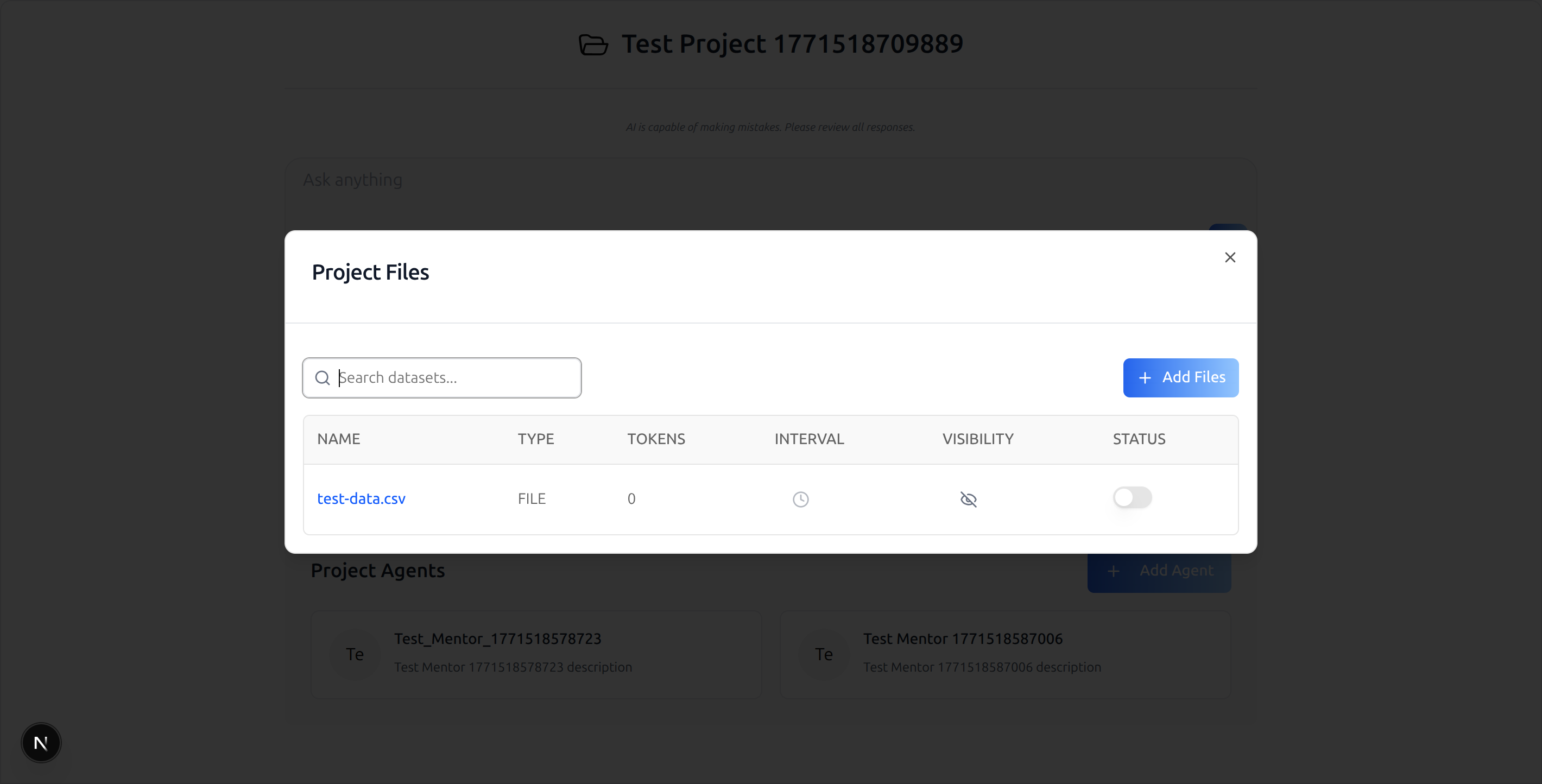
files" opens the SDK'sProjectFilesModal. Clicking "Add project
instructions" opensProjectInstructionsModal. "Add Agent" opensAddMentorToProjectModal.
Do NOT add custom styles, colors, or CSS overrides to the SDK components. They ship with their own styling. Keep them as-is. Do NOT implement dark mode unless the user explicitly asks for it.
Common setup (brand, conventions, env files, verification): see
docs/skill-setup.md.
Prerequisites
This skill is a thin delta on top of /iblai-vibe-agent-chat. It does not duplicate the provider/store/peer-dep wiring — most of the integration cost lives over there. Run /iblai-vibe-agent-chat first.
/iblai-vibe-agent-chatcomplete (providers wrapped, store reducers
registered, service worker shipped, peer deps installed). The project surface uses the same <Chat> component, so the same wiring applies.
- An agent/mentor ID — same as
/iblai-vibe-agent-chat. - A real
projectIdto test against. Either:
- Create one in the admin UI, or - List the user's projects: GET https://api.$DOMAIN/dm/api/ai-mentor/orgs/<tenant>/users/<username>/projects/?limit=5 (use Authorization: Token <axd_token>; $DOMAIN is DOMAIN from iblai.env, default iblai.app).
- Minimum SDK versions. The
projectIdprop on<Chat>and the
ProjectLandingPage slot were added in:
| package | min version |
|---|---|
@iblai/iblai-js |
^2.9.1 |
@iblai/agent-ai |
^2.9.3 |
- Pre-flight prop check (do this before writing the route):
``bash grep -q "projectId?: string" \ node_modules/@iblai/web-containers/dist/next/index.d.ts \ && echo "projectId prop present" \ || echo "MISSING — upgrade @iblai/web-containers (Step 2)" ``
What Gets Wired
| File | Change |
|---|---|
package.json |
(No new packages — already covered by /iblai-vibe-agent-chat if both are on the same SDK release. If the host is on an older SDK, bump to the versions above.) |
app/agents/[mentorId]/projects/[projectId]/page.tsx |
New route rendering <Chat> with projectId={projectId} (Step 3) |
Step 1: Confirm /iblai-vibe-agent-chat is Wired
The project surface inherits all of /iblai-vibe-agent-chat's setup. Don't proceed until you confirm:
| Check | Command / file | |
|---|---|---|
Auth providers tree wrapped in <ServiceWorkerProvider> |
providers/index.tsx |
|
skip={isSsoLoginRoute} on Auth + Tenant providers |
providers/index.tsx |
|
chat, chatInput, chatSliceShared, files, rbac, subscription, topBanner reducers registered |
store/index.ts |
|
public/sw.js present |
ls public/sw.js |
|
@iblai/agent-ai installed |
`cat node_modules/@iblai/agent-ai/package.json \ | grep version` |
/agents/[mentorId]/chat-new route renders for an authed user |
open in browser |
If any of these fail, run /iblai-vibe-agent-chat first.
Step 2: Bump the SDK if Needed
If /iblai-vibe-agent-chat was set up against an older SDK release, bump the packages so projectId is recognized:
pnpm add @iblai/iblai-js@^2.9.1 @iblai/agent-ai@^2.9.3(v2 bundles web-containers, web-utils, and data-layer as @iblai/iblai-js/ subpaths — the separate @iblai/web-/@iblai/data-layer packages are v1-era and must not be installed alongside v2.)
Run the Pre-flight prop check in Prerequisites to confirm projectId?: string is on the Chat Props type.
Step 3: Create the Route
Create app/agents/[mentorId]/projects/[projectId]/page.tsx:
"use client";

export const dynamic = "force-dynamic";

import { Suspense, useEffect, useState } from "react";
import { useParams, useRouter } from "next/navigation";
import { Chat, type ChatConfig } from "@iblai/iblai-js/web-containers/next";
import {
  useUsername,
  useAxdToken,
  useUserTenants,
  useVisitingTenant,
  useIsAdmin,
} from "@iblai/iblai-js/web-utils";
import { redirectToAuthSpa } from "@/lib/iblai/auth-utils";
import config from "@/lib/iblai/config";

export default function AgentProjectPageWrapper() {
  return (
    <Suspense fallback={null}>
      <AgentProjectPage />
    </Suspense>
  );
}

function AgentProjectPage() {
  const { mentorId, projectId } = useParams<{
    mentorId: string;
    projectId: string;
  }>();
  const router = useRouter();
  const [tenantKey, setTenantKey] = useState("");

  useEffect(() => {
    const appTenant = localStorage.getItem("app_tenant");
    const tenant = localStorage.getItem("tenant");
    let currentTenant = "";
    try {
      currentTenant =
        JSON.parse(localStorage.getItem("current_tenant") ?? "{}")?.key ?? "";
    } catch {}
    setTenantKey(
      appTenant || currentTenant || tenant || config.mainTenantKey(),
    );
  }, []);

  const username = useUsername();
  const axdToken = useAxdToken();
  const { userTenants } = useUserTenants();
  const { visitingTenant } = useVisitingTenant();
  const isAdmin = useIsAdmin();

  const chatConfig: ChatConfig = {
    baseWsUrl: () => config.wsUrl(),
    supportEmail: () =>
      process.env.NEXT_PUBLIC_SUPPORT_EMAIL ?? "[email protected]",
    authUrl: () => config.authUrl(),
    mainTenantKey: config.mainTenantKey(),
    navigateToAdminBilling: () =>
      router.push(`/agents/${mentorId}/settings?tab=billing`),
    navigateToExplore: () => router.push("/agents"),
    navigateToMentor: (id) => router.push(`/agents/${id}`),
  };

  // Gate render until all 3 IDs are available — projectId from URL,
  // mentorId from URL, tenantKey from localStorage.
  if (!tenantKey || !mentorId || !projectId) return null;

  return (
    <div className="flex h-screen w-full flex-col">
      <Chat
        isPreviewMode={false}
        mentorId={mentorId}
        tenantKey={tenantKey}
        projectId={projectId}   /* ← only change vs /iblai-vibe-agent-chat */
        config={chatConfig}
        redirectToAuthSpa={redirectToAuthSpa}
        username={username ?? null}
        userTenants={userTenants ?? []}
        visitingTenant={visitingTenant}
        axdToken={axdToken ?? ""}
        userIsStudent={!isAdmin}
      />
    </div>
  );
}
Why each piece:
| Item | Why | ||||
|---|---|---|---|---|---|
Same wrapper / Suspense / dynamic / chatConfig / hooks as /iblai-vibe-agent-chat |
The SDK component is the same; only the projectId prop differs. |
||||
mentorId from useParams<{ mentorId; projectId }>() |
Project chats are agent-scoped — the WebSocket session still needs a agent. | ||||
projectId from useParams<...>() |
Triggers the SDK to render ProjectLandingPage instead of the default welcome surface. |
||||
| `if (!tenantKey \ | \ | !mentorId \ | \ | !projectId) return null` | All three are required; render only when all are resolved. |
tenantKey from localStorage (appTenant / current_tenant / tenant / config.mainTenantKey()) |
Matches /iblai-vibe-agent-chat's pattern. |
What the SDK Does With projectId
<Chat> itself doesn't change shape. Internally, when projectId is truthy, the bundled WelcomeChatNew slot switches its render branch:
- Calls
useGetUserProjectDetailsQuery({ id: parseInt(projectId) }) - If the project resolves, renders
<ProjectLandingPage>with the
project name, chat input, Project files card (opens ProjectFilesModal), Add project instructions card (opens ProjectInstructionsModal), and Project Agents grid (opens AddMentorToProjectModal from the "Add Agent" button)
- If the project 404s, the surface renders empty — you'll see a clean
body and a [data-layer] API error in the console. Don't treat that as a bug in this skill; verify the projectId exists for the authenticated user/tenant.
The chat input you see in the project surface is the same chat input as the regular <Chat> flow — sending a message creates a session scoped to this project + agent combo (the WebSocket URL still uses mentorId).
Props
The full Chat props table is in /iblai-vibe-agent-chat. The project-relevant delta:
| Prop | Type | Required | Description |
|---|---|---|---|
projectId |
string |
no | Stringified integer matching a project the user has access to. When set, the welcome surface switches to ProjectLandingPage. |
mentorId |
string |
yes | Still required even with projectId set — the chat session is agent-scoped. |
ChatConfig is identical to /iblai-vibe-agent-chat — no project-specific fields.
Step 4: Verify
pnpm build— must pass with zero errors.pnpm dev, log in, navigate to
http://localhost:3000/agents/<mentorId>/projects/<projectId>.
- You should see:
- The project name as the page heading (folder icon next to it) - "AI is capable of making mistakes…" disclaimer - "Ask anything" chat input with the standard action buttons (Canvas, Prompts, voice, screen-share, send) + Web Search toggle - "Project files" card showing "N files added" - "Add project instructions" card - "Project Agents" section with the assigned agent cards and an "Add Agent" button
- Click "Project files" → SDK's
ProjectFilesModalopens with the
datasets table.
- Open
/agents/<mentorId>/projects/<bad-id>to confirm graceful 404
handling (empty body + data-layer console error, no app crash).
If the project surface renders but the chat WebSocket can't connect, that's a backend issue (LLM config on the agent) — see /iblai-vibe-agent-chat's Known issues.
Brand guidelines: BRAND.md