
SKILL.md
/iblai-vibe-agent-support
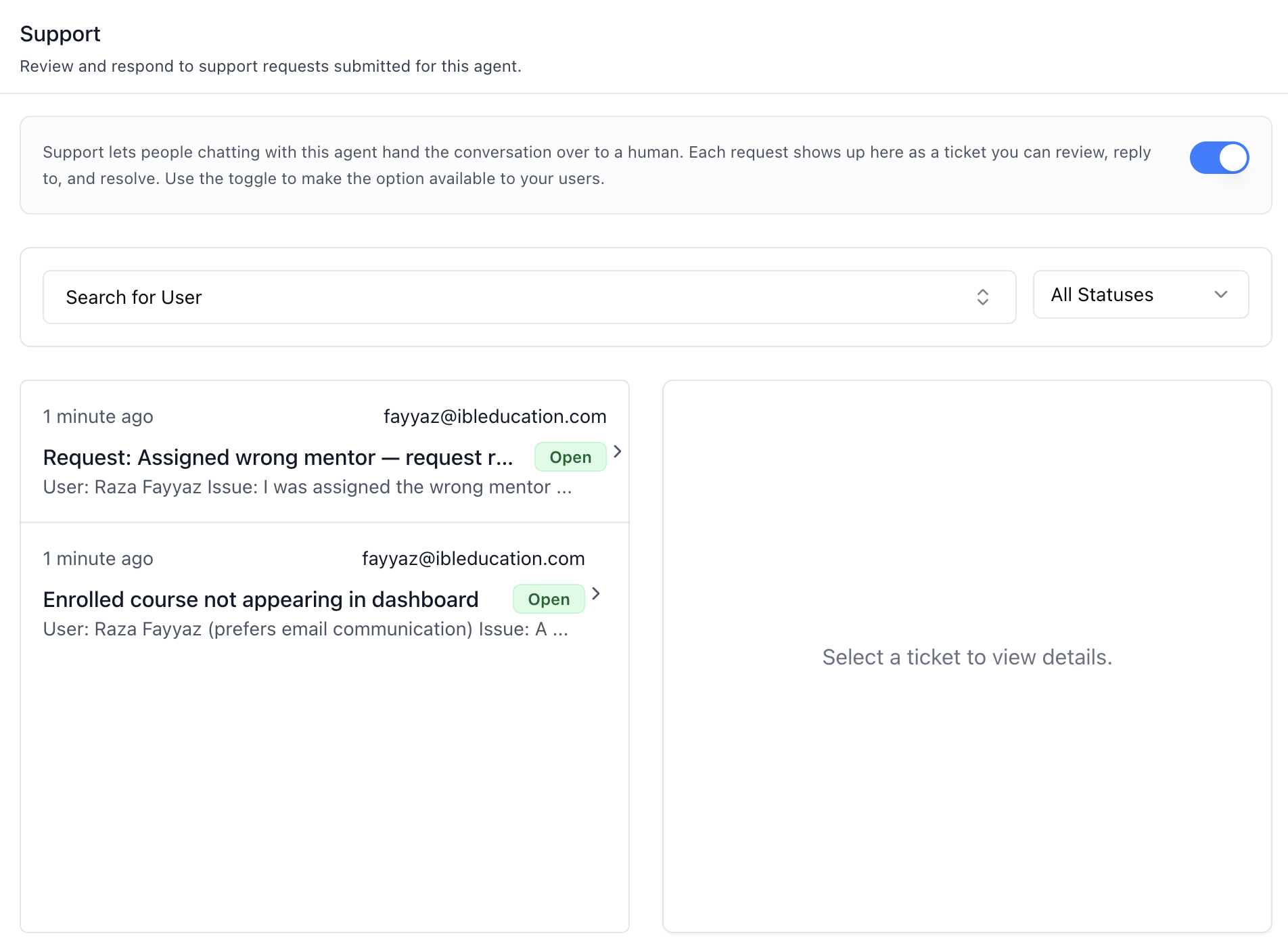
Add the agent Support tab -- human support ticket management for the agent. Support lets people chatting with the agent hand the conversation over to a human; each request shows up as a ticket that admins can review, reply to, and resolve. The tab has an availability toggle, user and status filters, a paginated ticket inbox, and a ticket detail pane with status control and a reply thread. This is one tab in the wider agent-settings family. All tabs share the same AgentSettingsProvider wrapper.
Do NOT add custom styles, colors, or CSS overrides to ibl.ai SDK components. They ship with their own styling. Keep the components as-is. Do NOT implement dark mode unless the user explicitly asks for it.
When building custom UI around SDK components, use the ibl.ai brand:
- Primary:
#0058cc, Gradient:linear-gradient(135deg, #00b0ef, #0058cc) - Button:
bg-gradient-to-r from-[#2563EB] to-[#93C5FD] text-white - Font: System sans-serif stack, Style: shadcn/ui new-york variant
- Follow the component hierarchy: use ibl.ai SDK components
(@iblai/iblai-js) first, then shadcn/ui for everything else (npx shadcn@latest add <component>). Do NOT write custom components when an ibl.ai or shadcn equivalent exists. Both share the same Tailwind theme and render in ibl.ai brand colors automatically.
- Follow BRAND.md for
colors, typography, spacing, and component styles.
You MUST run /iblai-vibe-ops-test before telling the user the work is ready.
After all work is complete, start a dev server (pnpm dev) so the user can see the result at http://localhost:3000.
iblai.env is NOT a .env.local replacement — it only holds the 3 shorthand variables (DOMAIN, PLATFORM, TOKEN). Next.js still reads its runtime env vars from .env.local.
Use pnpm as the default package manager. Fall back to npm if pnpm is not installed.
Common setup (brand, conventions, env files, verification): see docs/skill-setup.md.
Prerequisites
- Auth must be set up first (
/iblai-vibe-auth) - MCP server + skills configured (
@iblai/mcpin.mcp.json) AgentSettingsProvidermust wrap the route (see/iblai-vibe-agent-setting
Step 2 if not already set up). This tab reads its identity from the provider only — there are no identity prop overrides.
- Ask the user for a real
mentorId(agent UUID). Do NOT invent one.
Step 1: Check Environment
Before proceeding, check for an iblai.env in the project root. Look for PLATFORM, DOMAIN, and TOKEN variables. If the file does not exist or is missing these variables, tell the user: "You need an iblai.env with your platform configuration. Download the template and fill in your values: curl -o iblai.env https://raw.githubusercontent.com/iblai/vibe/refs/heads/main/iblai.env"
Step 2: Mount AgentHumanSupportTab
// app/(app)/agents/[mentorId]/support/page.tsx
"use client";

import { AgentHumanSupportTab } from "@iblai/iblai-js/web-containers/next";

export default function AgentSupportPage() {
  return (
    <div className="flex h-full flex-col bg-white">
      <AgentHumanSupportTab />
    </div>
  );
}
AgentHumanSupportTab reads tenantKey, mentorId, and username from AgentSettingsProvider. Pagination renders out of the box via the built-in IblPagination — no host wiring needed.
Step 3: Customize Labels (Optional)
import { AgentHumanSupportTab } from "@iblai/iblai-js/web-containers/next";

<AgentHumanSupportTab
  labels={{
    header: { title: "Help Desk" },
    detail: { sendReply: "Reply" },
  }}
/>;
Step 4: Use MCP Tools for Customization
get_component_info("AgentHumanSupportTab")
get_component_info("AgentSettingsProvider")
<AgentHumanSupportTab> Props
Import from @iblai/iblai-js/web-containers/next.
| Prop | Type | Required | Description |
|---|---|---|---|
labels |
DeepPartial<HumanSupportTabLabels> |
No | Override user-visible strings |
PaginationComponent |
React.ComponentType<{ currentPage, totalPages, onPageChange, disabled, disableNumberedButtons }> |
No | Replace the built-in IblPagination used under the ticket list |
What the tab renders
- Header — "Support" title and description.
- Info box + availability toggle — explains the hand-over-to-a-human
flow. The switch is the agent's human support tool (the same toggle shown in the Tools tab, surfaced here where the feature lives). Existing tickets stay fully actionable even while the option is switched off for users.
- Filters — a searchable user combobox (type to search the tenant's
users, debounced; shows emails and filters tickets by that requester, with an "All Users" reset) and a status select (All Statuses / Open / In Progress / Closed).
- Ticket inbox (left column) — 10 tickets per page, each row showing
time-ago, requester email, subject, a status badge (Open = green, In Progress = amber, Closed = gray), and a one-line body preview. Pagination appears when there is more than one page.
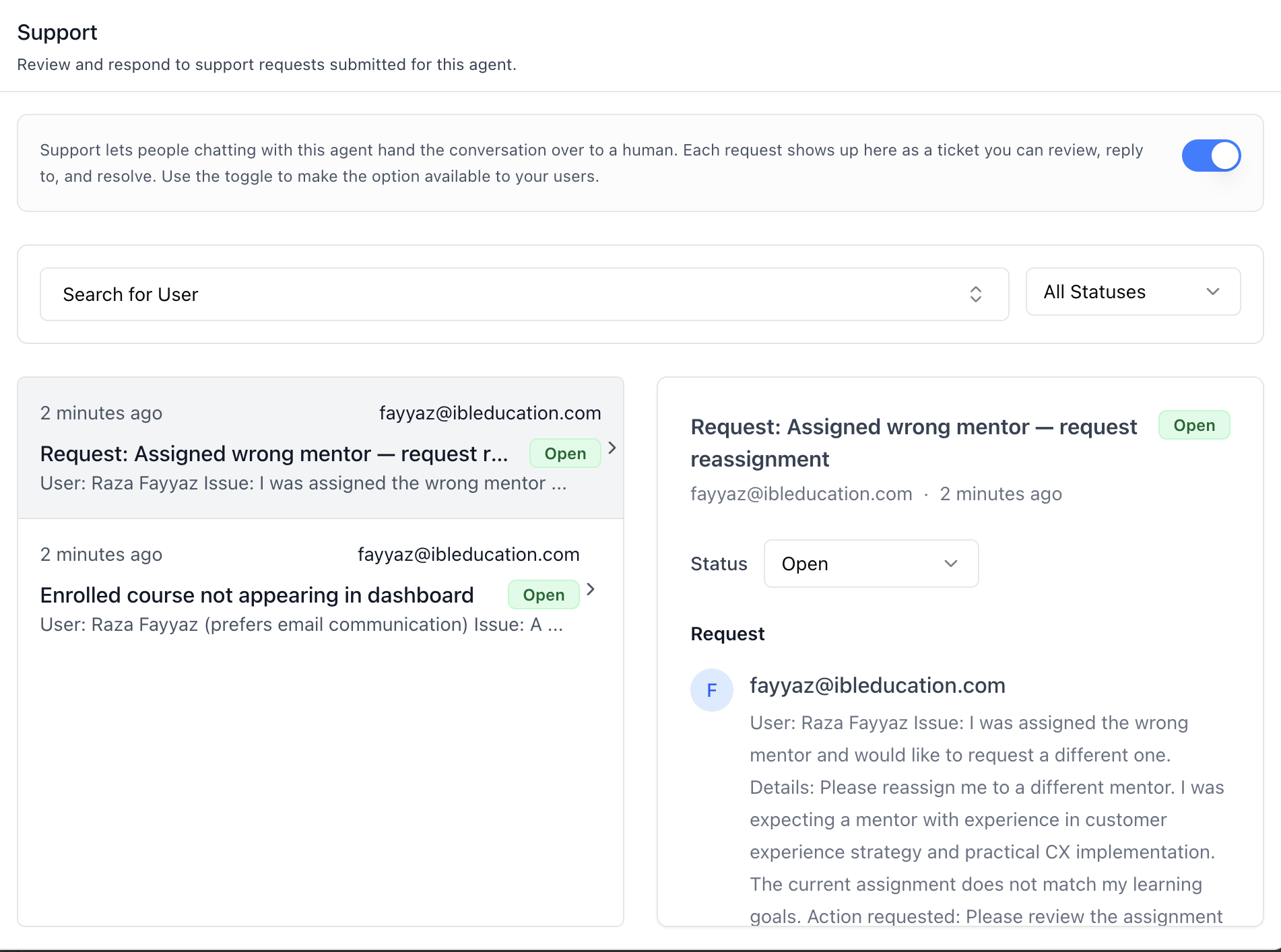
- Ticket detail (right column) — on desktop; below the
md
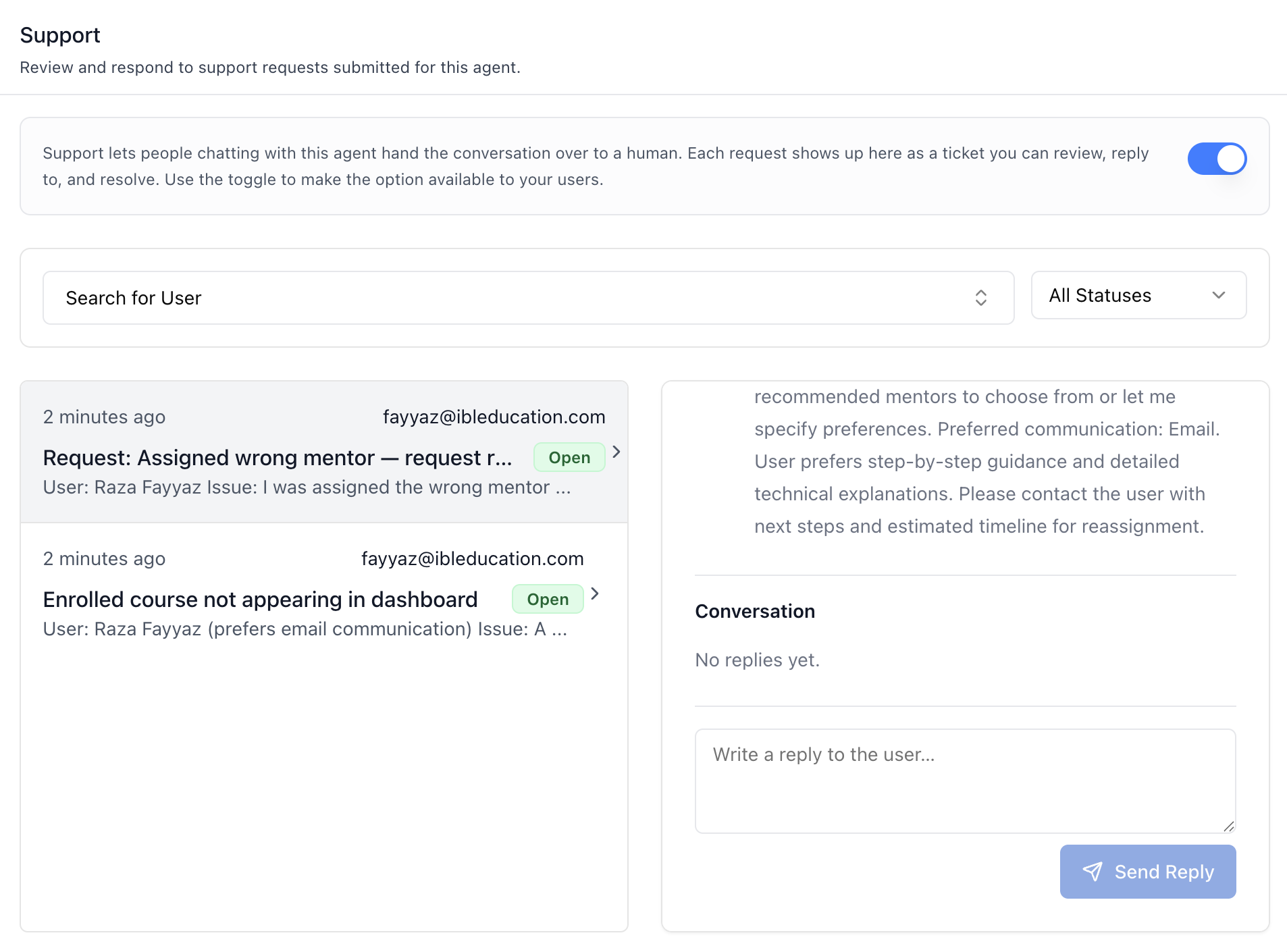
breakpoint clicking a ticket opens the detail in a dialog instead. Shows the subject, requester, time, and: - Status dropdown — Open / In Progress / Closed. Setting Closed calls the dedicated close endpoint; the others patch the ticket. - Request — the original ticket body. Agent-authored bodies may be HTML or Markdown; both render sanitized, and plain text renders as-is. - Conversation — the reply thread, oldest first, distinguishing the requester from the Support Team. - Reply box — textarea + Send Reply. Closed tickets show a notice instead ("Set it back to Open or In Progress to reply.").
Related Exports
From @iblai/iblai-js/web-containers/next:
AGENTHUMANSUPPORTTABLABELS-- the default agent-facing label bundle.HumanSupportTabLabels-- type for the full label bundle.AgentHumanSupportTabProps-- props type for the tab.SupportTicketsFilter-- type of the status/username filter state.
From @iblai/iblai-js/data-layer -- the RTK Query hooks and types the tab uses, for custom UI built on the same endpoints:
useGetSupportTicketsQuery,useGetSupportTicketMessagesQuery,
useCreateSupportTicketMessageMutation, usePatchSupportTicketMutation, useCloseSupportTicketMutation, usePlatformUsersQuery
SupportTicket,SupportTicketMessage,SupportTicketStatus
Step 5: Verify
Run /iblai-vibe-ops-test before telling the user the work is ready:
pnpm build-- must pass with zero errorspnpm test-- vitest must pass- Start dev server and touch test:
``bash pnpm dev & npx playwright screenshot http://localhost:3000/agents/<id>/support /tmp/agent-support.png ``
Important Notes
- Redux store: Must include
mentorReducerandmentorMiddleware initializeDataLayer(): 5 args (v1.2+)@reduxjs/toolkit: Deduplicated via webpack aliases innext.config.ts- Peer deps:
sonnerand@iblai/iblai-web-mentormust be installed
(pnpm add sonner @iblai/iblai-web-mentor)
- Shared provider:
AgentSettingsProvidermust wrap the route at a
layout level — this tab throws without it (it uses the required context, not the optional one). See /iblai-vibe-agent-setting Step 2 for the full snippet.
- Availability is a tool toggle: Turning support on/off toggles the
agent's human support tool slug — the same state as the Tools tab (/iblai-vibe-agent-tool). If the tool is not available on the platform, the switch is hidden but the inbox still works.
- Ticket scoping: Tickets are scoped to this agent via its
mentoruniqueid (resolved from the agent's public settings).
- Brand guidelines: BRAND.md