
SKILL.md
/iblai-vibe-agent-mcp
Add the agent MCP tab -- Model Context Protocol connector management with a Featured Connectors gallery, a custom Connectors section with add/edit/delete, OAuth connection flow, token-based auth, per-connector scope (tenant or this-mentor), transport selection (SSE / WebSocket / Streamable HTTP), and search/date/transport filters. This is one tab in the wider agent-settings family. All tabs share the same AgentSettingsProvider wrapper.
Do NOT add custom styles, colors, or CSS overrides to ibl.ai SDK components. They ship with their own styling. Keep the components as-is. Do NOT implement dark mode unless the user explicitly asks for it.
When building custom UI around SDK components, use the ibl.ai brand:
- Primary:
#0058cc, Gradient:linear-gradient(135deg, #00b0ef, #0058cc) - Button:
bg-gradient-to-r from-[#2563EB] to-[#93C5FD] text-white - Font: System sans-serif stack, Style: shadcn/ui new-york variant
- Follow the component hierarchy: use ibl.ai SDK components
(@iblai/iblai-js) first, then shadcn/ui for everything else (npx shadcn@latest add <component>). Do NOT write custom components when an ibl.ai or shadcn equivalent exists. Both share the same Tailwind theme and render in ibl.ai brand colors automatically.
- Follow BRAND.md for
colors, typography, spacing, and component styles.
You MUST run /iblai-vibe-ops-test before telling the user the work is ready.
After all work is complete, start a dev server (pnpm dev) so the user can see the result at http://localhost:3000.
iblai.env is NOT a .env.local replacement — it only holds the 3 shorthand variables (DOMAIN, PLATFORM, TOKEN). Next.js still reads its runtime env vars from .env.local.
Use pnpm as the default package manager. Fall back to npm if pnpm is not installed.
Common setup (brand, conventions, env files, verification): see docs/skill-setup.md.
Prerequisites
- Auth must be set up first (
/iblai-vibe-auth) - MCP server + skills configured (
@iblai/mcpin.mcp.json) AgentSettingsProvidermust wrap the route (see/iblai-vibe-agent-setting
Step 2 if not already set up)
- Ask the user for a real
mentorId(agent UUID). Do NOT invent one.
Step 1: Check Environment
Before proceeding, check for an iblai.env in the project root. Look for PLATFORM, DOMAIN, and TOKEN variables. If the file does not exist or is missing these variables, tell the user: "You need an iblai.env with your platform configuration. Download the template and fill in your values: curl -o iblai.env https://raw.githubusercontent.com/iblai/vibe/refs/heads/main/iblai.env"
Step 2: Mount McpTab
// app/(app)/agents/[mentorId]/mcp/page.tsx
"use client";

import { McpTab } from "@iblai/iblai-js/web-containers/next";

export default function AgentMCPPage() {
  return (
    <div className="flex h-full flex-col bg-white">
      <McpTab />
    </div>
  );
}
McpTab reads tenantKey, mentorId, username, and rbacPermissions from AgentSettingsProvider. No props are required for the standard mount.
With a select handler (e.g. picker mode)
When the tab is used inside a picker (e.g. "choose a connector for this workflow") rather than as a standalone page, pass onSelect. The handler fires after the chosen connector is auto-activated.
import { McpTab } from "@iblai/iblai-js/web-containers/next";

<McpTab
  onSelect={(server) => {
    console.log("connector selected", server);
  }}
/>;
Step 3: Use MCP Tools for Customization
get_component_info("McpTab")
get_component_info("AgentSettingsProvider")
<McpTab> Props
Import from @iblai/iblai-js/web-containers/next.
| Prop | Type | Required | Description |
|---|---|---|---|
onSelect |
(server: MCPServer) => void |
No | Called with the chosen connector when the user clicks Select. Without it the Select button is hidden and the tab behaves as a manager-only view. |
What the tab renders
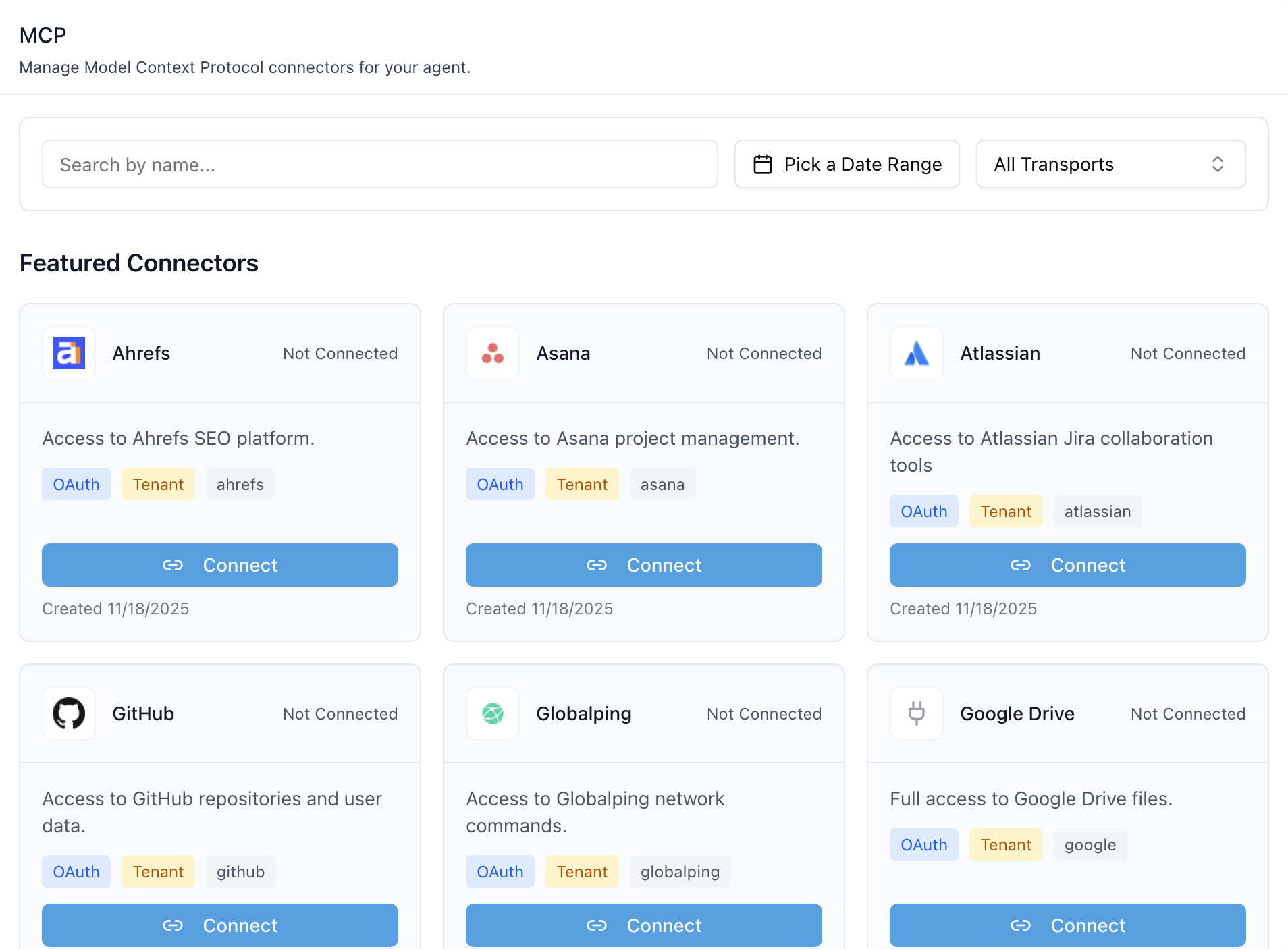
- Header — "MCP" title and description.
- Filters bar — search by name, date-range picker, transport
multiselect (SSE / WebSocket / Streamable HTTP / All).
- Featured Connectors — global, platform-curated MCP servers
(Ahrefs, Asana, Atlassian, GitHub, Google Drive, …). Each card shows the logo, name, connection state, auth-type chip (OAuth / Token), scope chip (User / Mentor / Tenant), provider tag, and a Connect / Disconnect button.
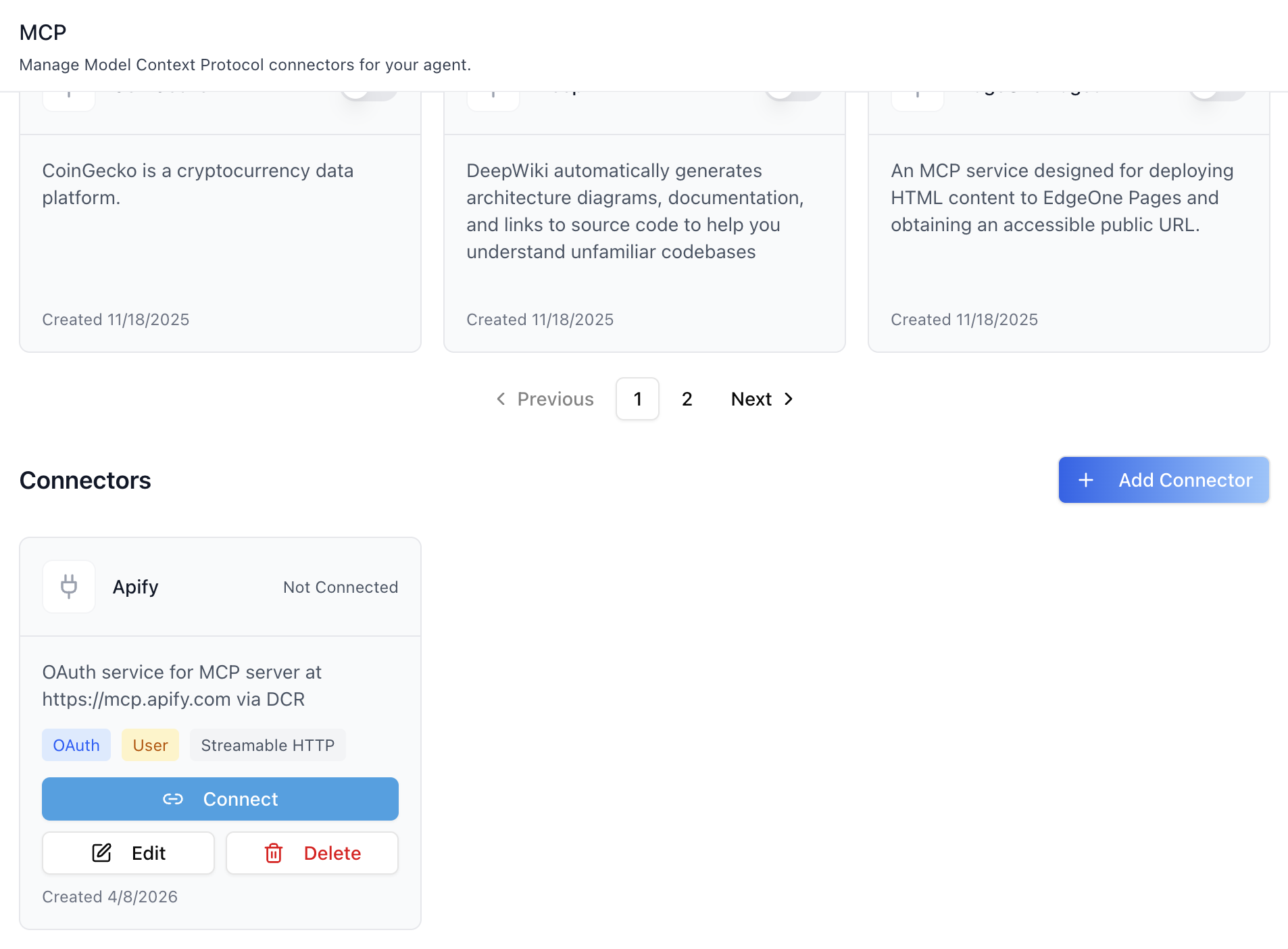
- Connectors — custom servers registered by the tenant. Each card
has a Connect/Disconnect button (when OAuth) plus Edit and Delete. The Add Connector button opens the add dialog.
- Pagination — separate pagers for Featured and Connectors when
results overflow the page size (12).
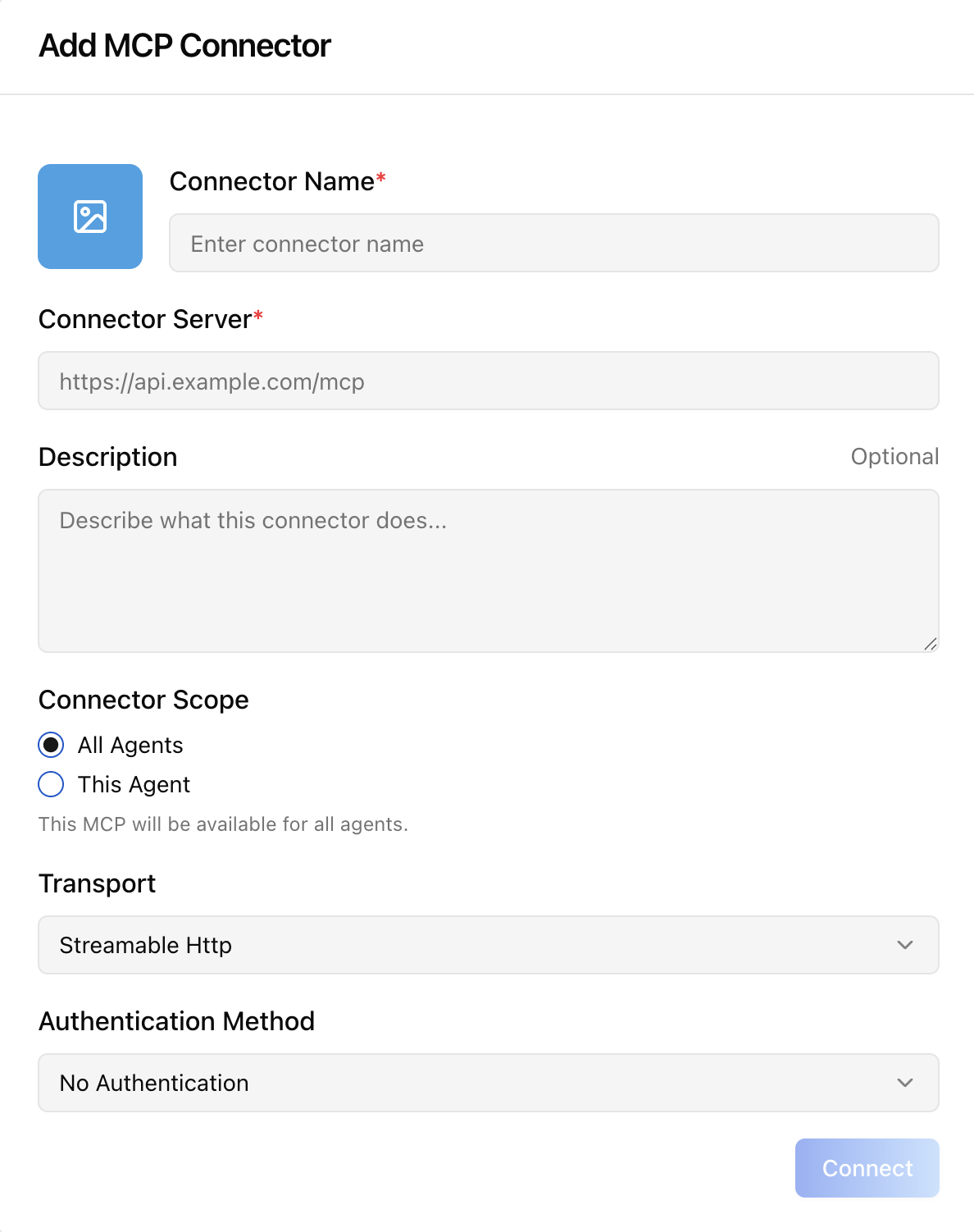
Add MCP Connector dialog
Opened from the Add Connector button. Collects:
| Field | Notes |
|---|---|
| Connector image | Optional file upload (max 2 MB, image/*). |
| Connector Name | Required. |
| Connector Server | Required. Must be a valid URL. |
| Description | Optional. |
| Connector Scope | All Agents (tenant) or This Agent (agent-bound). |
| Transport | SSE / WebSocket / Streamable Http (default). |
| Authentication Method | No Authentication / API Key / OAuth. |
| Authentication Scope | OAuth-only: Tenant / Mentor / User. |
| Token Type + Token | API-Key only: Bearer / Basic / API-Key / API-Token / Token / Other (custom alphanumeric+hyphen, ≤50 chars). |
For OAuth, submitting the form opens the provider's consent screen in a new tab and the dialog tracks completion via storage, message, and focus events plus a 5 s polling fallback.
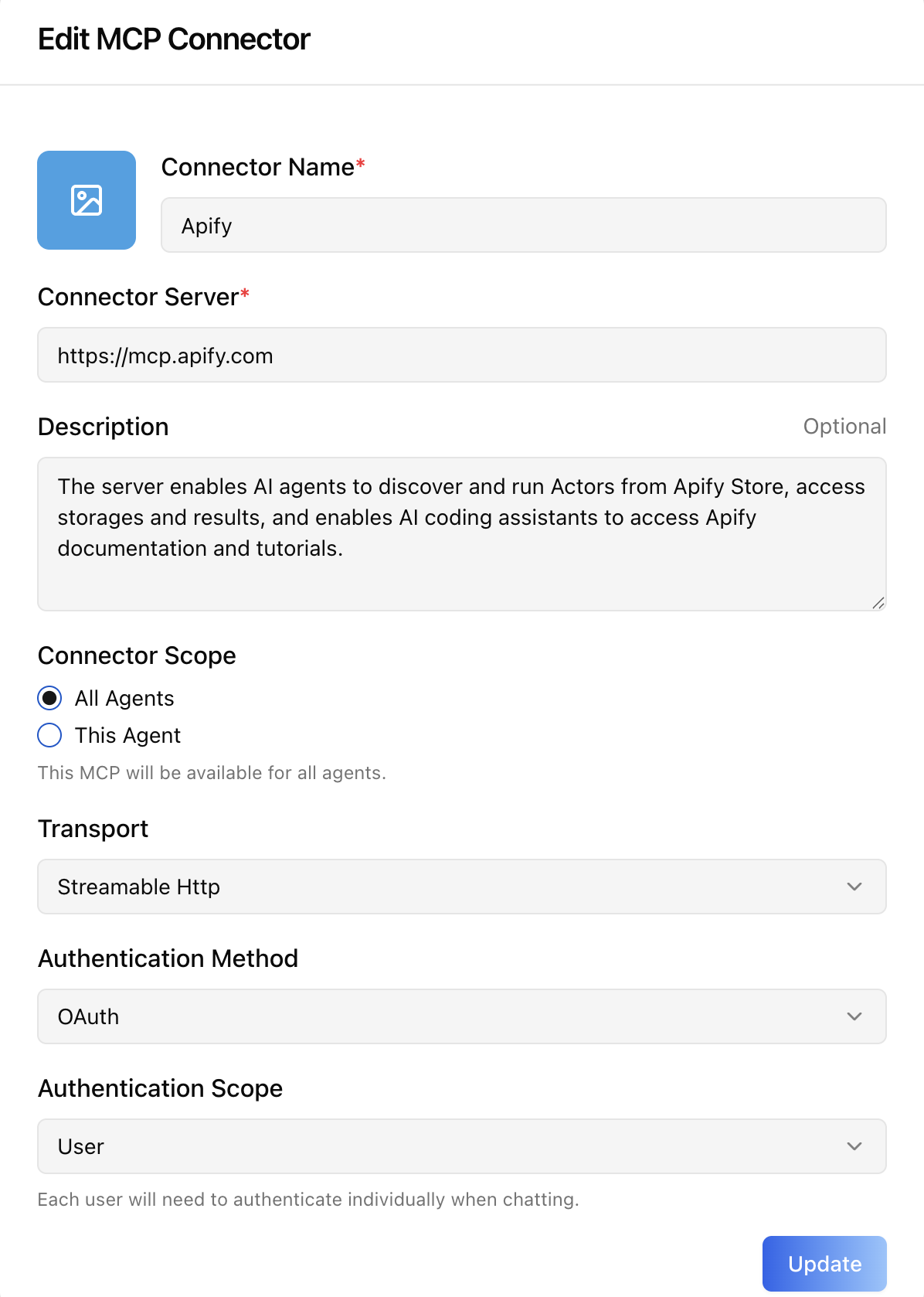
Edit MCP Connector dialog
Same shape as Add. The token field is masked (••••••••••••••••••••) — leave it untouched to keep the existing secret, or type a new value to rotate. Changing the OAuth Connector Server URL restarts the OAuth handshake.
How the OAuth flow works
- User clicks Connect on an OAuth card.
- UI calls
POST .../oauth-flow/startand opens the returned
auth_url in a new tab.
- After the user grants consent, the provider redirects back to the
app's /google-oauth-callback/ page (or equivalent), which posts a GOOGLEAUTHSUCCESS message and writes oauthconnectioncomplete to localStorage.
- The MCP tab observes either signal and creates a
MCPServerConnection record bound to the configured scope (user, mentor, or tenant).
- Refetches Featured / Custom / ConnectedServices /
MCPServerConnections / agent settings — the card flips to Disconnect.
A 5-minute safety timeout cleans up listeners if the user abandons the flow. Closing the popup early triggers a 10 s grace cleanup so a late-arriving callback can still complete.
Related Exports
From @iblai/iblai-js/web-containers/next:
McpTabProps— type for theonSelecthandler.
From @iblai/data-layer:
MCPServer,MCPServerConnection,ConnectedService— payload
types for custom UI built on top of the same RTK Query hooks the tab uses (useGetMCPServersQuery, useGetMCPServerConnectionsQuery, useCreateMCPServerConnectionMutation, useDisconnectServiceMutation, useLazyStartOAuthFlowQuery).
Step 4: Verify
Run /iblai-vibe-ops-test before telling the user the work is ready:
pnpm build-- must pass with zero errorspnpm test-- vitest must pass- Start dev server and touch test:
``bash pnpm dev & npx playwright screenshot http://localhost:3000/agents/<id>/mcp /tmp/agent-mcp.png ``
Important Notes
- Redux store: Must include
mentorReducerandmentorMiddleware initializeDataLayer(): 5 args (v1.2+)@reduxjs/toolkit: Deduplicated via webpack aliases innext.config.ts- Peer deps:
sonnerand@iblai/iblai-web-mentormust be installed
(pnpm add sonner @iblai/iblai-web-mentor)
- Shared provider:
AgentSettingsProvidermust wrap the route at a
layout level. See /iblai-vibe-agent-setting Step 2 for the full snippet.
- OAuth callback page: For OAuth-backed connectors, the consuming
app must host a callback route (e.g. app/google-oauth-callback/page.tsx) that posts GOOGLEAUTHSUCCESS via window.opener.postMessage and writes oauthconnectioncomplete to localStorage so the parent window can resolve the flow.
- Tools toggle: Activating a connector for the first time
auto-adds mcp to the agent's toolslugs and sets canusetools=true. Deactivating the last connector removes mcp from toolslugs again — see /iblai-vibe-agent-tool for the broader tools tab.
- Brand guidelines: BRAND.md
MCP Servers REST API
For custom UI beyond <McpTab> — register external MCP servers and bind them to agents. All endpoints are prefixed with ${dmUrl}/api/ai-mentor/orgs/{org}/users/{userid}/ where dmUrl is NEXTPUBLICAPIBASE_URL. Tenant admins only.
Workflow
- Enable the MCP tool on the agent (so the runtime will use MCP servers).
- Register an MCP server record (URL, transport, auth_type).
- Create a connection binding credentials to a scope (
tenant,
user, or mentor).
- Assign servers to the agent via the agent settings endpoint.
1. Enable MCP tool on the agent
| Method | Path | Body |
|---|---|---|
| PUT | mentors/{mentor_id}/settings/ |
{ "toolslugs": ["mcp", ...], "canuse_tools": true } |
2. MCP Servers
| Method | Path | Purpose |
|---|---|---|
| GET | mcp-servers/ |
List tenant + featured servers (filters: isfeatured, transport, search, mentoruniqueid, includeglobal) |
| POST | mcp-servers/ |
Register a new server (multipart for image upload) |
| PATCH/PUT | mcp-servers/{id}/ |
Update |
| DELETE | mcp-servers/{id}/ |
Delete |
| GET | mcp-servers/oauth-find/ |
Resolve OAuth provider/service for a server URL |
Create body:
{
  "name": "Google Drive MCP",
  "description": "Search and index Drive documents",
  "url": "https://drive-mcp.example.com/mcp",
  "transport": "streamable_http",
  "auth_type": "oauth2",
  "auth_scope": "user",
  "mentor": null
}transport:sse|websocket|streamable_httpauth_type:none|token|oauth2auth_scope(oauth only):tenant|mentor|usermentor:nullfor tenant-wide, agent UUID for agent-bound- For
auth_type=token, setcredentialsto the full header value
(e.g. "Bearer abc123").
3. MCP Server Connections
| Method | Path | Purpose |
|---|---|---|
| GET | mcp-server-connections/ |
List connections |
| POST | mcp-server-connections/ |
Create a connection |
| PATCH/PUT | mcp-server-connections/{id}/ |
Update / toggle is_active / change scope |
| DELETE | mcp-server-connections/{id}/ |
Delete |
OAuth (user scope) — requires an existing ConnectedService:
{
  "server": 9,
  "scope": "user",
  "auth_type": "oauth2",
  "user": "alice",
  "connected_service": 77
}
Agent scope — bind credentials to a single agent while keeping the server reusable:
{
  "server": 9,
  "scope": "mentor",
  "auth_type": "oauth2",
  "mentor": "mentor-uuid",
  "connected_service": 77
}
Returned credentials are masked; only send a new value when the user intentionally rotates the secret.
4. Assign servers to a agent
| Method | Path | Body |
|---|---|---|
| PUT | mentors/{mentor}/settings/ |
{ "mcp_servers": [1, 2] } |
The mcp_servers array replaces the agent's current list.
Connection resolution at runtime
- User-scoped connection (matching invoking user)
- Agent-scoped connection (matching active agent)
- Tenant-scoped connection
- Featured server fallback (
is_featured=trueglobal)
OAuth Connectors REST API
For OAuth-backed MCP servers, each user must grant permission once per provider/service before a MCPServerConnection can reference a ConnectedService. All endpoints are under ${dmUrl}/api/accounts/.
| Method | Path | Purpose |
|---|---|---|
| GET | orgs/{org}/oauth-services/ |
List enabled services across providers |
| GET | connected-services/orgs/{org}/users/{user_id}/{provider}/{service}/ |
Start flow — returns { auth_url } |
| GET | connected-services/callback/?code=...&state=... |
Handle vendor redirect |
| GET | connected-services/orgs/{org}/users/{user_id}/ |
List the user's connected services |
| DELETE | connected-services/orgs/{org}/users/{user_id}/{id}/ |
Revoke a connection |
Common errors
400 "No credentials found"— admin must configureauth_{provider}
in the credential store.
400 OAuth2 connections require a connected service.— finish the
OAuth handshake first and pass connected_service when creating the MCPServerConnection.
400 Selected MCP server is not available to the current tenant.—
the server belongs to another tenant and is not is_featured=true.